
Content Optimization Guide for 2026: What to Keep, Fix, and Drop: A Practical Guide
Content optimization is the work of making a page more useful to its readers and easier for Google to index, understand, and show. In October 2026 that work looks different from what most guides still describe. AI Overviews change what a click is worth, Google published its first official guidance on generative AI features in May, and several tools and reports that older articles recommend no longer exist.
This Mega SEO content optimization guide version drops the advice that expired and rebuilds the process around Google’s own documentation, Search Console, and independent research. Where a claim needs a source, the source is named in the text.
Key Takeaways
What is Content Optimization and Why It Matters for SEO
Content optimization is the ongoing process of improving a page’s usefulness, accuracy, structure, and technical accessibility so the right readers find it in search and stay to finish it. It covers new drafts and pages you already published. In 2026 it also covers making a page eligible to appear in Google’s AI Overviews and AI Mode.
Google treats those AI features as part of Search, not a separate channel. Its May 2026 guide says they are rooted in the same ranking and quality systems, and it names two techniques behind them. Retrieval-augmented generation pulls relevant pages from the Search index to ground an answer. Query fan-out runs several related searches at once; Google’s example is a question about a weedy lawn that fans out into searches on herbicides, chemical-free removal, and prevention.
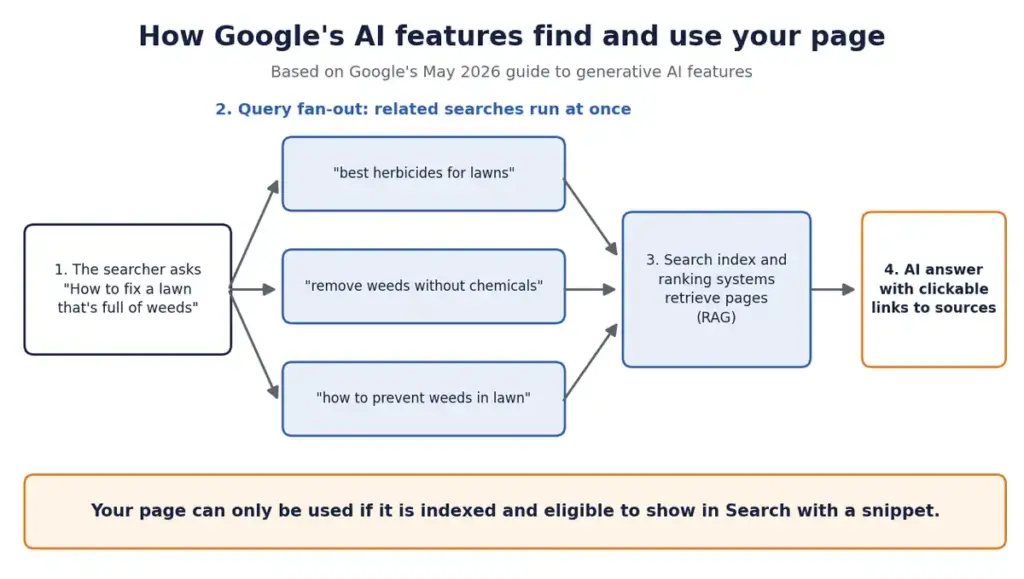
The same guide says terms like AEO and GEO describe work that is, from Google’s side, still SEO. So, content optimization here means one discipline with four jobs: match the query’s intent, add substance the reader cannot get elsewhere, make the page easy to read and crawl, and check the result in Google’s own data. The ten steps below follow that order.
Does content optimization still matter when AI answers the question?
Yes. A page must be indexed and eligible to show with a snippet before it can appear in any Google AI feature, and those features draw on pages from the regular Search index. What has changed is the return on a click. Learn more about creating customized posts with MEGA SEO.
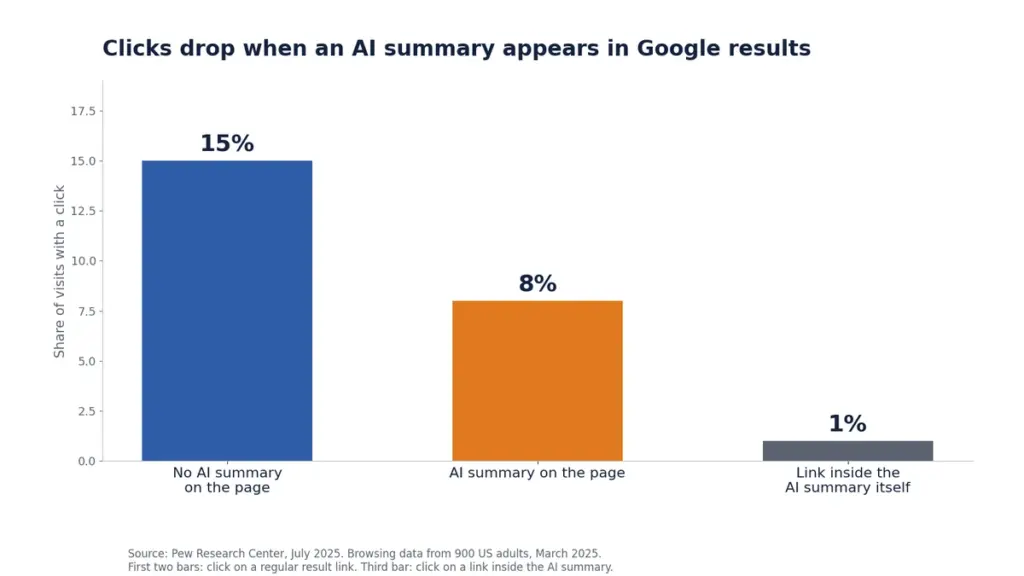
A Pew Research Center analysis of 900 US adults’ browsing in March 2025 found that people clicked a regular result link in 8% of visits when an AI summary appeared and in 15% of visits when it did not. Links inside the summary itself drew clicks in 1% of visits.
Query shape matters too. In the same study, 8% of one- or two-word searches produced an AI summary, compared with 53% of searches of ten words or more and 60% of searches that began with who, what, when, or why. Long, question-style queries are where informational pages face the most exposure, which is why step 10 adds visibility to the metrics you track.
The quality bar moved as well. Google’s Search Status Dashboard lists the March 2026 core update as running from March 27 to April 8, 2026, and Google called it a regular update without naming targets. Its generative AI guidance is more specific. Unique, useful content will likely influence a site’s presence in AI search more than any other suggestion in the guide, and building a page for each query variant to manipulate results can violate its scaled content abuse policy.
Which content optimization advice is outdated in 2026?
Seven pieces of common advice have expired or lack Google’s support. Check your own pages against each one.
| Older advice | What applies now | Where to confirm |
| Watch First Input Delay (FID) | Interaction to Next Paint (INP) replaced FID as a Core Web Vital in March 2024. A good INP is under 200 milliseconds. | Google Search Central, Core Web Vitals |
| Add FAQ schema to earn FAQ rich results | FAQ rich results stopped appearing in Google Search on May 7, 2026. Report and test support were scheduled for removal in June 2026, API support in August 2026. | Google’s FAQ structured data documentation |
| Test mobile-friendliness with the Mobile-Friendly Test | Google retired the tool and Search Console’s Mobile Usability report on December 1, 2023. Use Lighthouse or PageSpeed Insights. | Google Search Central Blog |
| Hit a 1 to 2 percent keyword density | Google’s spam policy defines keyword stuffing as unnatural repetition and gives no percentage target. | Google’s spam policies |
| Bounce rate means single-page visits | In GA4, bounce rate is the share of sessions that were not engaged: under 10 seconds, one page view, and no key event. | Google Analytics 4 documentation |
| Publish llms.txt and chunk content for AI | Google says Search ignores llms.txt and that content does not need to be split into tiny pieces. | Google’s generative AI guide |
| Write a page for each long-tail or fan-out variant | Google says doing this mainly to manipulate results can violate its scaled content abuse policy. | Google’s generative AI guide |
How do you optimize content step by step?
Work through these ten steps in order for a new article. For content optimization of a page that is already live, start at step 2.
1. Start from real query language
Pull the wording readers use from Google’s own tools before you outline: Search Console for queries that already show your pages, Google Trends for seasonality and comparisons, and Keyword Planner for volume ranges. Then read the pages that currently rank and note what they leave unanswered.
Keyword Planner sits inside Google Ads and tends to show broad volume ranges rather than exact figures unless the account has active ad spend, so treat its numbers as direction, not measurement. If you run paid search, the Search terms report in Google Ads lists the exact queries that triggered your ads. Those phrases make strong headings and FAQ questions because real buyers typed them. Our guide to advanced keyword research techniques covers this stage in more depth.
Keep one page per intent. Google warns that producing separate pages for each fan-out variant of a query, mainly to manipulate results, can violate its scaled content abuse policy. Cover the natural follow-up questions inside the one page.
2. Audit what you already have
Open the Performance report in Search Console, set the range to at least three months, and sort pages by impressions. Three patterns show where to work: pages with many impressions and a low click-through rate, pages whose impressions fell after a known update, and pages that compete for the same query. This is the perfect playbook for your content optimization.
The first pattern usually points to a title or snippet that does not match what searchers want, so fix that before rewriting the body. For the second, compare a window before March 27 with one after April 8 to see the March 2026 core update, and wait at least a week after a rollout ends before judging, as Google advises. For the third, merge the pages or give each a distinct purpose.
3. Add something only your team knows
Add one element a competitor cannot copy: your own test, a measured result, a screenshot from your account, a mistake you corrected, or a decision you made and the reason. Google separates commodity content, such as a generic list of tips, from content built on first-hand experience, and says the second kind stands out to its AI systems.
Write it in specifics: dates, counts, what broke, what you changed. ‘We compared our draft with the live page and found five gallery images with the wrong label’ gives a reader and a model something to use. ‘Accuracy matters’ gives neither. The audit results further down show what this looks like in practice.
4. Write for the reader, then check the structure
Lead each section with its answer, use headings that name the question or topic, and keep paragraphs short enough to scan on a phone. Do it for readers first. Google states that content does not need to be split into tiny pieces for AI and that there is no ideal page length.
That matters because many content optimization guides still sell chunking as a requirement. Google’s systems can find the relevant part of a longer page, so length should follow the topic. Use a table when a comparison has several attributes, a numbered list for steps, and plain paragraphs for reasoning. Add images or video when they explain something, with descriptive file names and alt text; Google lists high-quality images and video as a way to appear beyond text links in its AI features.
Read the draft aloud. Any sentence you stumble over, usually one with a repeated keyword or three stacked clauses, gets rewritten.
5. Set the on-page elements
Write a title tag and meta description that say what the page delivers, put the primary phrase in the title, the H1, and the first paragraph, and use it in a heading only where it reads naturally. Google generates title links and snippets automatically, so the text you write may not be the text shown.
Write both to describe the page truthfully, and add descriptive alt text to each meaningful image. Our on-page SEO guide lists the elements in the order we check them.
6. Secure the technical floor
Confirm the page is indexed, loads on a phone, and meets the Core Web Vitals targets Google publishes: Largest Contentful Paint within 2.5 seconds, Interaction to Next Paint under 200 milliseconds, and Cumulative Layout Shift under 0.1. Google recommends good scores for success in Search and for a good experience generally.
Use the URL Inspection tool in Search Console to check indexing, and the Core Web Vitals report for field data from real visitors. PageSpeed Insights and Lighthouse help diagnose why a metric fails. Google indexes with its smartphone crawler, and since July 5, 2024 a site whose content cannot be reached on a phone is no longer indexable, so test on a real device. The old Mobile-Friendly Test is gone; Google points to Lighthouse instead. For fixes, see our guide to Core Web Vitals techniques and our note on mobile experience and rankings.
7. Use structured data for accuracy, not for ranking
Add Article, Organization, and Breadcrumb markup that matches what is visible on the page, and validate it with the Rich Results Test. Google says structured data is not required for its generative AI features and that no special schema.org markup exists for them, though it still helps with rich-result eligibility.
FAQ markup needs a specific note. As of May 7, 2026, FAQ rich results no longer appear in Google Search, and Google scheduled the Search Console report and Rich Results Test support for removal in June 2026 and API support for August 2026. Google’s John Mueller said pages with the markup need no changes and that it can be removed if you added it for Search. The questions themselves still help readers. For products and local businesses, Google points to Merchant Center feeds and Google Business Profile as routes into AI responses.
8. Link internally with purpose
Link each article to the pages a reader needs next, using anchor text that names the destination. Skip ‘click here’ and skip pointing dozens of unrelated pages at one target. Give each important page at least one inbound internal link.
Search Console’s Links report lists your most internally linked pages, which makes orphaned articles easy to spot. Group related articles around a hub so the cluster is clear to readers; our content optimization category is built that way.
9. Refresh with real changes, and date them honestly
In the content optimization process update a page when facts, tools, or screenshots change, and change the visible date only after a significant update. Google’s guidance says to show when a page was significantly updated and warns against artificially freshening a story without adding significant information.
A useful refresh replaces outdated numbers with dated, sourced ones, removes references to retired tools, checks outbound links, and adds what you learned since publishing. Keep the original publish date visible beside the updated date, and make sure the dates in your structured data match what readers see.
10. Measure in Search Console and GA4
Track impressions, clicks, and average position in the Performance report, engaged sessions and key events in Google Analytics 4, and AI-feature impressions in the Generative AI report in Search Console. Google says that report reached all websites worldwide on August 31, 2026.
The report lists impressions, pages, countries, devices, and dates for AI Overviews and AI Mode, with Discover reported separately. Its metric list has no clicks, so use it to see which pages appear in AI answers, then compare those pages’ clicks and engagement in the standard reports. Google also added a property-level control in Search Console settings that lets a site opt out of these features.
In GA4, bounce rate is the share of sessions that were not engaged. A session counts as engaged if it lasts 10 seconds or longer, includes two or more page views, or triggers a key event. That definition differs from Universal Analytics, so do not compare old and new bounce rates. Give a refreshed page several weeks before judging it, and record the change date so you can compare like periods.
How often should the main keyword appear?
Often enough to make the topic clear, and not so often that the text sounds unnatural. Google’s spam policy defines keyword stuffing by that unnatural repetition and names no percentage. The older advice of 1 to 2 percent is a rule of thumb from writing tools, not a Google requirement, and it can push writers into stiff copy.
Our working rule is to keep the exact primary phrase under 1 percent of the words, place it in the title, H1, opening paragraph, and one heading, and then use synonyms and related terms the way a person would.
How do you use AI drafts without publishing filler?
Treat an AI draft as a first pass and add a human layer before publishing. Google says AI-assisted content is acceptable when it meets its Search Essentials and spam policies, and it tells site owners not to recycle what others have said or what a generative model could easily produce on its own.
The risk sits in volume without review. Google’s scaled content abuse policy targets many pages produced mainly to manipulate rankings, whoever or whatever wrote them.
What we found when we audited AI-assisted pages
These results come from our own work, not a survey.
Two AI-generated city service pages from our local SEO content pipeline scored 4 out of 10 and 5 out of 10 in our audit. The faults were contradictions between sections, facts the model made up, and citations to sources that do not exist.
While rewriting articles for allprintablepages.com, we compared each draft with the live page before writing. On the insect coloring pages article, five gallery images carried reptile names such as Gecko and Nile Crocodile over pictures of insects, and a direct count of the gallery gave 33 designs. On the ocean animals page, the FAQ answer under a question about downloading was text about calligraphy paper.
Our own AI-assisted drafts made errors too. One added an ‘animal mandala’ example because mandala was in the keyword list, though the gallery held no mandala image. Another summarized a published study as showing that mandala coloring cut anxiety more than free drawing, when the study found mandala and plaid patterns worked about equally and both beat unstructured coloring. We caught both only by checking the draft against its source.
The pattern was consistent. The riskiest sentences are the specific ones, such as counts, names, and study findings, because they sound authoritative whether or not they are true. That is why the human pass has five checks:
Which tools do you need for content optimization?
Google’s free products cover most of the workflow: Search Console, Google Analytics 4, PageSpeed Insights, Lighthouse, Google Trends, and the Rich Results Test. Keyword Planner and the Google Ads Search terms report add query research if you have an Ads account.
| Google product | Use it to |
| Search Console | Find queries and pages, check indexing, and read the Core Web Vitals and Generative AI reports. |
| Google Analytics 4 | Measure engaged sessions, key events, and traffic by source. |
| PageSpeed Insights and Lighthouse | Diagnose LCP, INP, and CLS problems and check how a page renders on mobile. |
| Google Trends | Compare interest in a topic over time and by region. |
| Google Keyword Planner | Estimate volume ranges and find related queries. Needs a Google Ads account. |
| Google Ads Search terms report | See the exact queries that triggered your ads. Needs running campaigns. |
| Rich Results Test | Validate structured data before you publish. |
MEGA SEO adds a drafting layer on top of that stack. Its free customized blog posts in minutes start from your topic and keywords, and the human pass above still applies to anything generated. See MEGA SEO pricing for plans, or contact the team if you want help applying this process to an existing library. You can also read about the people behind MEGA SEO.
Which mistakes cost the most?
Four mistakes show up repeatedly when we review content programs:
Where should you start this week?
Pick five pages with high impressions and a low click-through rate in Search Console. Run steps 2 to 9 on them, record the change date, and compare the same pages a month later. Small, measured changes on pages that already have impressions will teach you more than a new article published without a plan.
Frequently asked questions